
Measured on 2026-11-11.
Baseline and change. The baseline is The original clip of the shot, as the film has it. A swap is judged against the clip it started from, so the original goes first, beside its results.
The changes set against it:
- One picture: the empty ferry deck
- Four pictures: the deck, the deck from the bow, a bell and lamp, a stormy sky with a gull
We gave our own MiniMax H3 one shot and asked it to keep the person and change the world around him. With one picture, the world changed late. With several pictures, it changed sooner. One reader looked at a few frames, and nobody has compared the clips blind.
What did we want to know?
A product launched on MiniMax H3 that keeps the person’s performance in a video and changes the world around them, using reference pictures. We did not test that product. We tried the same idea on our own MiniMax H3.
We took one of our own shots as the reference video, and gave the model one picture, or several, of places from the same film. We asked plain questions. Does the person stay? Does the world become the pictures’? What does it cost on one RTX 5090?
See also: Our person-swap test, which this one turns round
What is the baseline?
The baseline is the original clip of the shot, as the film has it. A swap is judged against the clip it started from, so the original goes first, beside its results.
How did we test it?
We used one shot from our test film: a man on a ferry, looking up. The shot runs eight seconds. We cut its first five seconds and used that as the reference video.
We ran the swap twice. The first run had one picture, the empty ferry deck. The second had several: the deck, the deck seen from the bow, a bell and a lamp, and a stormy sky with a gull.
Both ran on one RTX 5090 graphics card, restarted clean before each run, with the same size (1344×768), the same seed and silent output. A seed is the number that starts a draw.
The runs differ in the number of pictures and in the words. The words for the several pictures name the further ones as other sides of the place, a prop and its light.
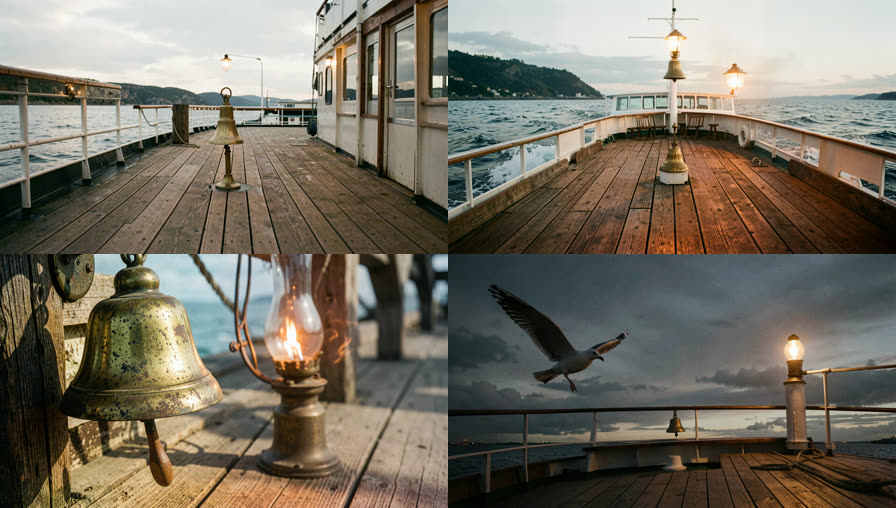
The pictures of the second run. The first is also the one picture of the first run.
What happened?
Both runs finished, with no memory failure. The run with one picture took 318.67 seconds, and the run with several pictures took 354.901, as the drawing software counted them.
That is 63.73 and 70.98 seconds of the card’s work for each second of finished clip. Each is one clip, so neither is a rate.
The original of the shot: the man looking up on the ferry.
One picture, the empty deck. The person is kept, and the open deck comes late in the clip.
Several pictures. The person is kept, a deck is there first, then a stormy dusk with a lamp, and the last picture’s gull flies in.
| Seconds | Card seconds for each finished second | Peak memory, megabytes | |
|---|---|---|---|
| One picture | 318.67 | 63.73 | 28,695 |
| Several pictures | 354.901 | 70.98 | 29,366 |
Did the person stay?
By eye, yes, in both clips. One reader looked at a few frames of each clip, near the start, in the middle and near the end, beside the original’s. The jacket, the face, the upward gaze, the framing and the movement stayed.
This is a spot check by one person. No picture model read the frames, and a few frames are not the whole clip.
Did the world change?
With one picture, the world changed late. The cabin wall with ropes and a lifebuoy, much like the original’s, is there near the start and in the middle of the clip. The picture’s open deck, with its railing, a ladder and a headland, is there near the end.
With several pictures, the dusk sky, lamp and sea of the last picture are there by the middle of the clip. The last picture’s gull is there near the end.
The gull is the last picture’s, put into the clip. It is not a defect of the model. The background follows the camera in both clips.
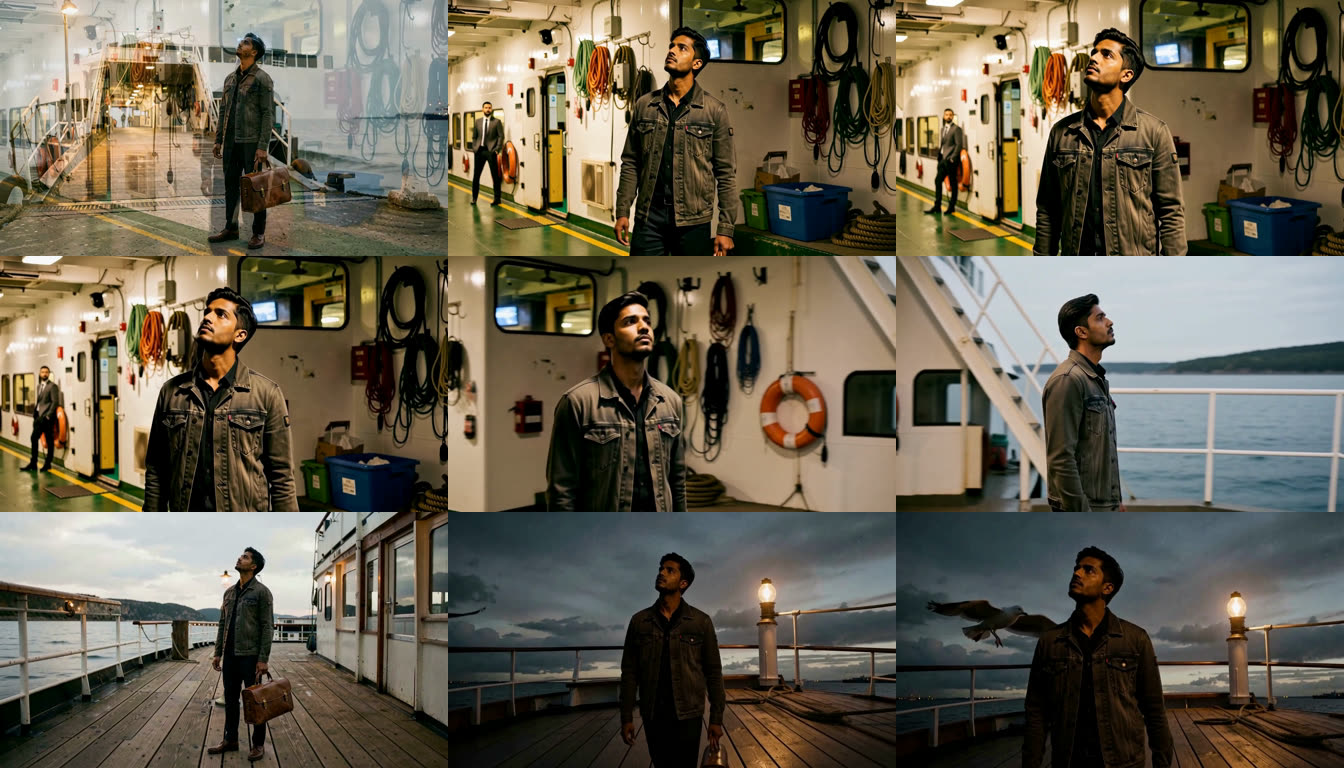
Frames of each clip near the start, in the middle and near the end. Top row: the original. Middle row: one picture. Bottom row: several pictures.
How far can we trust that reading?
It is one reader, a few frames of each clip, and no picture model. Between the frames we looked at, we cannot say when the world changed. Nobody compared the clips blind.
The runs differ in the pictures and in the words. So the difference in when the world changed belongs to this pair of runs, and not to the number of pictures alone. Each is one clip.
What can we not say?
We cannot say that the world changes in every shot. This is one shot.
We cannot say that one picture is enough. With one picture, the open deck was there only at the last frame we looked at.
We cannot say that the first picture gave the deck at the start of the clip with several pictures. The original’s own first frames are a dissolve that already shows a deck with a man and a briefcase.
We cannot say that the person is the same man in every frame. We looked at a few frames of each clip.
We cannot say that people judge the result a good change of world, because nobody compared it blind.
What is still open?
Whether it holds on other shots, other people and other films. Whether several pictures change the world sooner than one on the same shot, or only that these did. Whether a longer shot can be swapped: the shot’s full length ran out of memory on this card in an earlier test, which is why we cut it short.
Set it up yourself
Here are the downloads and the commands we used, copied from the test’s own files. Where a command held a private folder or machine name of ours, it shows a name in angle brackets for you to fill in.
What we used and what we ran, so you can try the same recipe on your own RTX 5090. The graph is ComfyUI's own Ref2VA template for MiniMax H3 with the Pika H3 Flex adapter, one reference video and one to four reference pictures.
What you need first.
- The graph needs about 29 GB of a 32 GB card, so restart ComfyUI before every run: in an earlier test a run straight after a good one ran out of memory.
- The reference video is the first 5 s of your clip at 24 fps and the drawn size 1344×768; 8 s ran out of memory on the same card in an earlier test.
Downloads.
- MiniMax H3 reference-to-video weights, revision
e5eb578a89295337b8ff433a035929ce0279e0b6diffusion_models/minimax_h3_ref2va_pruned_int8_convrot.safetensors, 20,970,379,616 bytes, sha2569255f52b6677845ad238f20dfaafa94727053694127ab7f255c048f0f9365779text_encoders/qwen3vl_32b_minimax_h3_nvfp4_awq.safetensors, 15,687,142,551 bytes, sha25635a88d51044231fe332301d7a62aa81e3f2cba62febeb446e2c1e3e0ef76f2c6vae/minimax_h3_video_vae_int8_convrot.safetensors, 2,811,065,184 bytes, sha25652a2c8c73583c86e4f41cdcce3a6ad0ea562987bc0bf3d60a0cef5f5c8e60c0evae/minimax_h3_audio_vae_fp32.safetensors, 605,254,808 bytes, sha2568e505d95dd1561d47abd43d4238fd40d9bb1ae9e147ed0a4cba778d76ae4db48loras/minimax_h3_ref2v_turbo_4step_v0.1_comfyui_bf16.safetensors, 1,956,193,000 bytes, sha2565b9ab5ade15d0775676d01a907268a69a1468dc6033b3b0d3ded5502f3ebb84c
- Pika H3 Flex adapter (the first recipe), revision
3ff166447d5edb1406107ab8370c42000ce173e4comfy/loras/pika_h3_flex_ref2va_comfy_bf16.safetensors, 1,956,172,176 bytes, sha256e4d058fbd027377b925a0ee607b514ddd9037873fee3afa05d73b302e6f7f8e1
- ComfyUI, revision
v0.43.2, commit 423cbd20511becb1f16122ab518e92e58bfa03d9 - PyTorch, revision
2.14.0 (with torchvision 0.29.0, CUDA 13.0 build)
Steps, in the order we ran them.
-
Install the system packages: git, the Python tools and a compiler.
sudo apt-get install -y git python3-venv python3-dev build-essential -
Get ComfyUI at the version we tested and check the commit.
mkdir -p <work folder> && cd <work folder> git clone -q --depth 1 --branch v0.43.2 https://github.com/comfyanonymous/ComfyUI.git ComfyUI cd <work folder>/ComfyUI && test "$(git rev-parse HEAD)" = 423cbd20511becb1f16122ab518e92e58bfa03d9 && echo pinned -
Make the Python environment and install PyTorch for the 5090, then ComfyUI's requirements with torch held.
python3 -m venv <work folder>/venv <work folder>/venv/bin/python -m pip install torch==2.14.0 torchvision==0.29.0 --index-url https://download.pytorch.org/whl/cu130 printf 'torch==2.14.0\ntorchvision==0.29.0\n' > <work folder>/constraints.txt cd <work folder>/ComfyUI && grep -v -E '^(torch|torchvision|torchaudio)[[:space:]]*$' requirements.txt > <work folder>/requirements.5090.txt <work folder>/venv/bin/python -m pip install --no-input -r <work folder>/requirements.5090.txt -c <work folder>/constraints.txt -
Download the model files into ComfyUI's model folders (the list above) and check each sha256; about 44 GB in all.
sha256sum <work folder>/ComfyUI/models/diffusion_models/minimax_h3_ref2va_pruned_int8_convrot.safetensors -
Cut the first 5 seconds of the source clip at 24 fps. Copy the four pictures (world1.png to world4.png, in the order the words name them) into ComfyUI's input folder.
ffmpeg -y -ss 0 -t 5 -i original.mp4 -vf "fps=24,scale=1344:768:flags=lanczos,setsar=1" -an -c:v libx264 -crf 14 -pix_fmt yuv420p <work folder>/ComfyUI/input/source_clip.mp4 cp world1.png world2.png world3.png world4.png <work folder>/ComfyUI/input/ -
Start ComfyUI, then queue the one-picture graph (save the downloaded graph file below as
graph-world-1-picture-api.json); the clip lands in ComfyUI's output folder.<work folder>/venv/bin/python <work folder>/ComfyUI/main.py --listen 127.0.0.1 --port 8188 --disable-auto-launch jq '{prompt: .}' graph-world-1-picture-api.json | curl -s -X POST http://127.0.0.1:8188/prompt -H 'Content-Type: application/json' -d @- -
When it has finished, stop ComfyUI with Ctrl-C so the card is clean, start it again and queue the four-picture graph (save its graph file as
graph-world-4-pictures-api.json).<work folder>/venv/bin/python <work folder>/ComfyUI/main.py --listen 127.0.0.1 --port 8188 --disable-auto-launch jq '{prompt: .}' graph-world-4-pictures-api.json | curl -s -X POST http://127.0.0.1:8188/prompt -H 'Content-Type: application/json' -d @-
The files we used, to download.
The one-picture graph (ComfyUI API format)
The four-picture graph (ComfyUI API format)
Who made what?
The recipe is ComfyUI’s template for MiniMax H3 reference-to-video, with Pika’s H3 Flex adapter, turned round from our person-swap test. The idea came from a product launched on MiniMax H3, which we did not test.
The clips and pictures shown are the test’s own files, with their metadata taken out. We are grateful to everyone who made these tools.
What does this mean?
On one shot, with one seed, the person stayed in both clips, by one reader’s eye. With several pictures, a stormy dusk was there by the middle of the clip. With one picture, the open deck was there only at the last frame we looked at, near the end.
The runs took 318.67 and 354.901 seconds on one RTX 5090. Whether people judge it a good change, and whether it holds on other shots, waits for a blind comparison and more shots.
Quick Search Our Blogs
Type in keywords and get instant access to related blog posts.