
Measured on 2026-11-08.
Baseline and change. The baseline is Maya-M on the engine's own settings (only its context window raised), for speed, and our usual model, Qwen3.8-27B, for the bug fix. The engine's own settings are how it runs before anyone tunes it; only the context window was raised, in its dashboard. Our usual model is what writes for us today. Each change is set against its own baseline.
The changes set against it:
- Maya-M with its settings tuned on this PC
- Maya-M on the bug fix
A very large coding model ran on one desktop PC, and a coding agent built a small program with it in about 6 minutes. We tuned it and gave it a real bug too. We also say what we have not yet checked.
What did we want to know?
A very large open model usually needs a rack of machines. We wanted to know whether one ordinary desktop PC could run one, fast enough to be useful for coding.
The model is GLM-5.3-Flash, made by Z.ai. It has 321 billion parameters, and about 18 billion of them work on each step. We ran Project Maya’s build of it, called Maya-M.
We asked plain questions. How fast does it write once tuned for this PC? Does it fix a real bug of ours? Can Claude Code, a coding agent, use it as its only model? We count speed in tokens, the small pieces of text that a model reads and writes.
What is the baseline?
For speed, the baseline is Maya-M on the engine’s own settings, the way it runs before anyone tunes it, with only its context window raised to 1,048,576 tokens. For the bug fix, the baseline is our usual model, Qwen3.8-27B, reached through our gateway.
Each change is set against its own baseline.
What did we run it on?
One desktop PC, with a pair of RTX 5090 graphics cards of 32 gigabytes each, 192 gigabytes of memory and a fast solid-state drive of 4 terabytes for the model.
The file of Maya-M is 116 gigabytes. The engine keeps the busiest pieces of the model on the cards and the rest in the PC’s memory. It is a desktop, not a server, and its screen runs on one of the cards.
The model fills both cards, about 31 gigabytes each, so while it runs they do nothing else.
How fast was it before any tuning?
On a first night we measured the engine as it came. It wrote about 26 tokens a second.
Reading a prompt of 8,511 tokens took about 6 seconds, which is roughly 1,400 tokens a second.
A prompt of 33,232 tokens took about 65 seconds, roughly 510 tokens a second.
Every prompt was one the engine had not seen before.
How did tuning change it?
Maya has a tuning step. It tried settings on this PC for about 7 minutes and measured the writing speed under each one. The settings decide how the work that does not fit on the graphics cards is shared with the processor.
The engine’s own default split was the slowest choice here, at 22.4 tokens a second. Putting all of that work on the processor gave 28.0.
Using 8 processor threads, the most it tried, gave 28.9. The best settings together gave 30.8 tokens a second.
The lesson is to measure on your own machine: the default was the slowest option on ours.
The tuner and the first night used different prompts, so 22.4 and 26 come from different measures, and do not contradict each other.
After tuning, a short prompt wrote 4,800 tokens in 148 seconds, which is 33.1 tokens a second.
| Setting | Writing speed (tokens a second) |
|---|---|
| The engine's default split | 22.4 |
| All of that work on the processor | 28.0 |
| More processor threads | 28.9 |
| The best settings together | 30.8 |
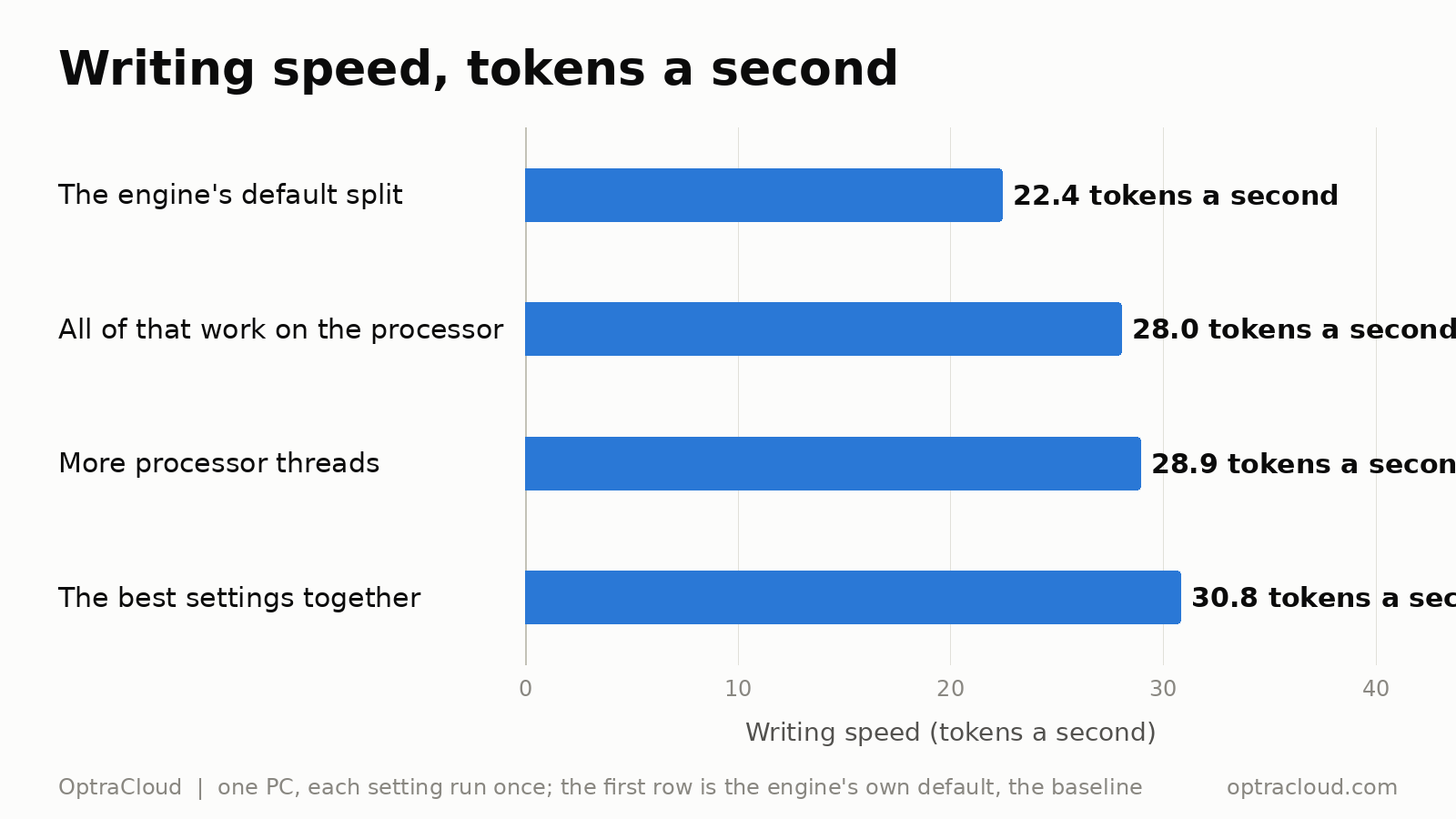
Writing speed, tokens a second
To share. Pictures of these numbers, made from the same record and sized for a phone:
Did a different drafting method help?
A drafting method lets the engine guess several words ahead and check them. Maya offers a built-in method and another called DFlash2.
On the same long document, the built-in method wrote 26.8 tokens a second and DFlash2 wrote 24.2. So DFlash2 lost on this PC.
Maya’s own guide reports its fastest result, 123 tokens a second, with DFlash2 on a pair of RTX 5090 cards and an RTX 4090. What wins depends on the machine.
What about several requests at once?
With a pair of requests at once, each wrote about 20 tokens a second, roughly 40 in all. A big download was running on the same PC at the time, so take the numbers as a floor.
One request at a time gives the fastest single answer. More than one gives more output in all.
Did it fix a real bug?
The bug fix in this post is not a new run. It is the run of our first Maya-M test, made before any tuning, on the engine’s own settings with only its context window raised to 1,048,576 tokens.
We gave the same bug of ours to Maya-M and to our usual model, word for word. Both wrote the same patch.
These seconds are not a speed comparison. The models ran on different machines and engines, and our model thought for far longer on this bug.
See also: Our first Maya-M test, with the same bug fix
| Maya-M | Qwen3.8-27B | |
|---|---|---|
| Seconds for the whole reply | 43.7 | 402 |
| Tokens in the reply | 904 | 8,976 |
| Of those, thinking | 668 | 8,812 |
Can Claude Code use it as its only model?
Claude Code is a coding agent. We pointed it at the engine’s own interface, which speaks the same language, so every token came from the model on the desk. No Claude model was called.
The task was a complete Snake game in one web page: a grid, arrow keys, food and growth, speed-ups, game over, pause, restart and a saved best score.
The agent wrote a page of 225 lines, 6.7 kilobytes, in about 6 minutes.
It took one turn of 9,927 tokens, the thinking plus the file.
That took 350 seconds at 28.8 tokens a second, and a closing line of 77 tokens followed.
Later, a separate test ran a Snake prompt on more builds of the model and checked each game in a browser against a list of requirements. Its results are in our post on those builds as a coding agent.
Claude Code shows only a timer while the model thinks. A key press opens the full view, where the thinking streams live.
Play the page Maya-M wrote
This is the page the agent wrote in this test, as the run’s notes name it (the same line count and size). It is the file the model saved, unchanged, and it passed all ten items of the checker in the later test. This game starts as the page loads and reaches the wall in a few seconds, so it is probably over before you reach it. Click inside it, then press Enter or R to start a new game, and steer with the arrow keys or W, A, S, D. It has no touch controls, so it needs a keyboard. It runs apart from this page, so it cannot keep a best score between visits.
What does thinking cost?
Maya’s own chat page puts no limit on thinking. The same Snake prompt typed into it thought for 29,631 tokens over 18 minutes without starting its answer, and we stopped it.
Claude Code caps a turn at 32,000 tokens. Under that cap, the whole job took about 6 minutes.
So at maximum thinking, the limit matters more than the raw speed.
What bit us, and what may bite you?
Repeating a prompt measures the engine’s saved conversation, not the model. Later runs of the same prompt took 4 to 7 seconds.
The first runs took 15.6 and 71.1 seconds. Every speed above comes from a prompt the engine had never seen.
The tuning step refuses to run while any card holds more than 1 gigabyte. Our screen card holds about 1.9 gigabytes of desktop memory with nothing else running.
We stopped everything else on the cards and ran the tuning code with that one check skipped. That memory is there while it serves too, so the result reflects real use.
Put the model on the fast drive, as the engine’s own guide asks. Check every download against a pinned hash before you use it: a file of 156.3 gigabytes took 28 minutes.
If you serve it to other machines on a private network, a ping that works proves nothing about a connection: the network’s access policy must also allow it.
What did we not measure?
We ran each setting once, on one PC. The larger build of the model, Maya-L, and a third build were run in a later test, which is in our post on those builds as a coding agent.
Who made what?
The model, GLM-5.3-Flash, is from Z.ai. The build we ran, Maya-M, and the engine that runs it are Project Maya’s. We are grateful to both.
What does this mean?
A very large coding model ran on one desktop PC at about 30.8 tokens a second once tuned, and Claude Code built a Snake page with it in about 6 minutes.
The page it wrote passed our checker, and you can play it above. How this model stands against our usual one, across more work than one bug, is the next question.
Quick Search Our Blogs
Type in keywords and get instant access to related blog posts.