
Measured on 2026-11-07.
Baseline and change. The baseline is our text model today (Qwen3.8-27B), served through our gateway. Maya-M is set against the model that does our text work now, on one real bug.
The changes set against it:
- Maya-M (GLM-5.3-Flash-Maya) on Project Maya's own engine
A very large model, squeezed hard to fit, ran on a pair of graphics cards in one PC. It read a long prompt in about a minute and wrote at a steady pace. It also wrote a fix for a real bug of ours, in the same shape as our own model. This is one run and one bug, not a ranking.
What did we want to know?
Some open models are very large. To fit one in a PC, its numbers are squeezed hard. An engine called Project Maya runs one that way, and we wanted to see what it does.
We asked plain questions. Can the engine run one very large model, Maya-M, on a pair of graphics cards in one PC, at a speed that a writing or coding job could use? And does it write the same fix for a real bug of ours as the model that does our text work today?
What is the baseline?
The baseline is our text model today, Qwen3.8-27B, served through our gateway. Maya-M is set against it on one real bug. The speed figures stand on their own: the models ran on different machines and engines.
How did we test it?
Maya-M ran on one PC with the engine’s own default settings. The engine has a tuning step, and it refused to run, because another program held a little memory on one card.
Tokens are small pieces of text, about as long as a short word. Its context window, the amount of text it can hold at once, had been raised to 1,048,576 tokens before the run.
We timed a short prompt of 8,511 tokens and a long one of 33,232 tokens. A prompt is the text we hand the model. Each was cold: a prompt the engine has not seen before, which it reads in full before it writes a word.
How fast did it read and write?
The short prompt took about 6 seconds to read, which is about 1,400 tokens a second. The reply was then written at 26 tokens a second.
The long prompt took about 65 seconds, which is about 510 tokens a second. Its reply was written at 25.7 tokens a second.
So the writing speed stayed about the same while the prompt grew much longer. Reading is where the longer prompt costs time.
| Prompt | Prompt size (tokens) | Seconds to read it (s) | Writing speed (tokens a second) |
|---|---|---|---|
| The short prompt, cold | 8,511 | 6 | 26.0 |
| The long prompt, cold | 33,232 | 65 | 25.7 |
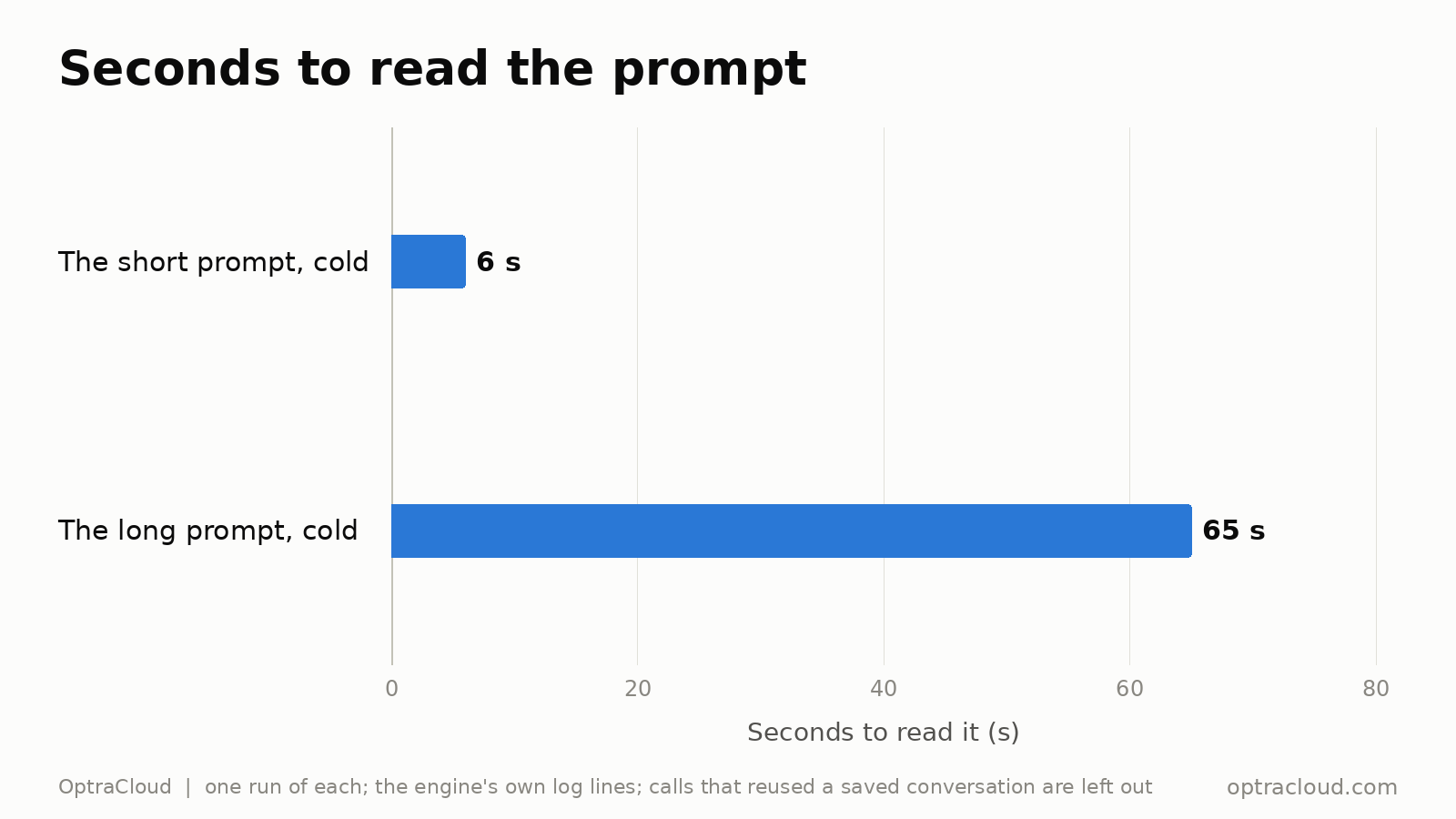
Seconds to read the prompt
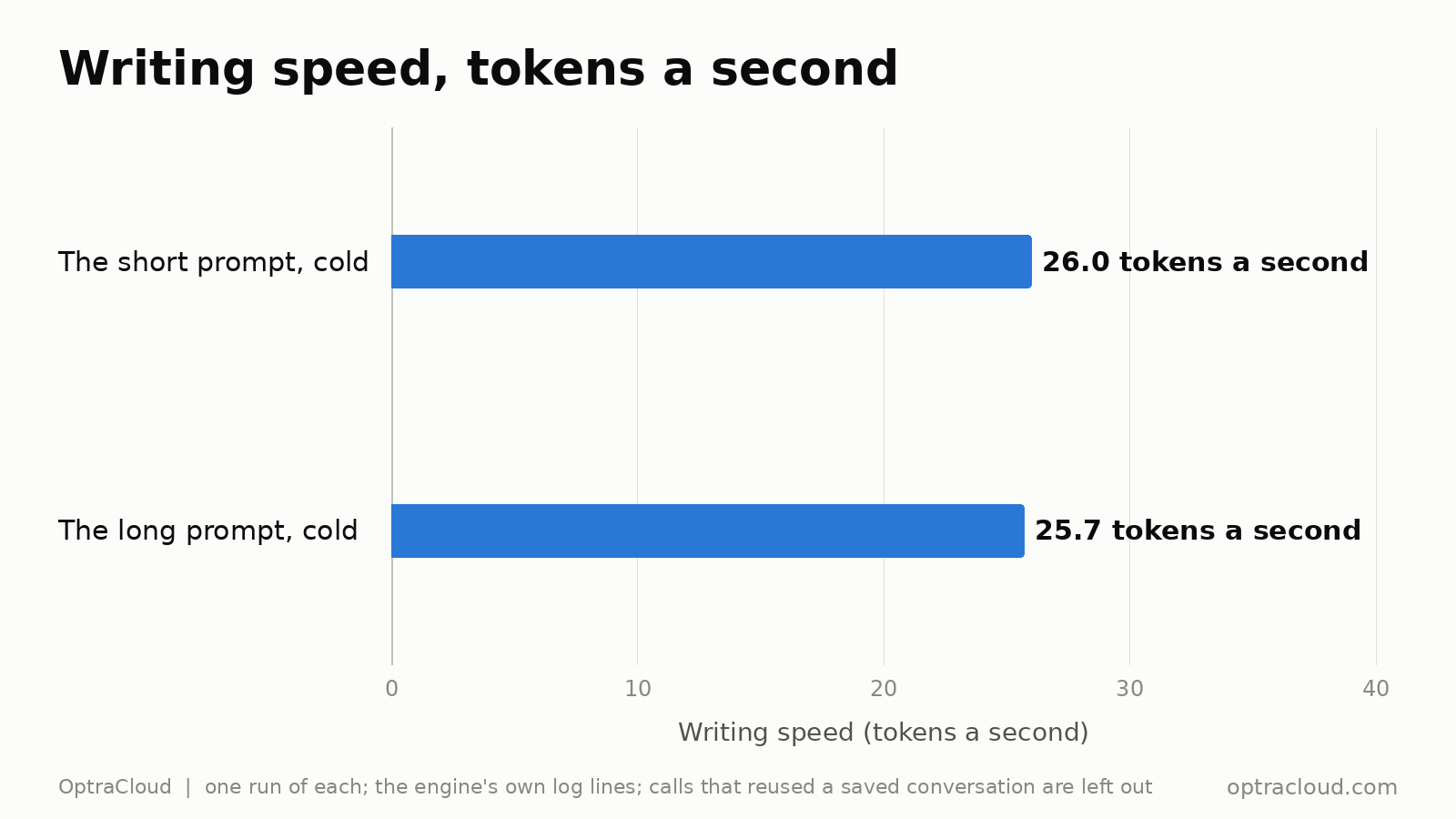
Writing speed, tokens a second
To share. Pictures of these numbers, made from the same record and sized for a phone:
Why do we give only the first call of each prompt?
We timed each prompt 3 times. Calls after the first sent the same prompt again, and the engine answered from its saved conversation, in 4 to 7 seconds.
That measures the engine’s memory of a conversation, not how fast it reads a new prompt. So we give none of those speeds as a reading or writing speed.
The bench also fitted one reading speed and one writing speed to all the calls together. It mixed cold calls with calls that reused a saved conversation, so the fit holds for neither, and we do not use it. The bench now asks every call a prompt that begins differently.
Did it fix a real bug?
We gave both models the same bug of ours, word for word, with thinking on and the same room for the reply. A function that works out a rate broke when a shot’s seconds were written as a word, not a number. Our own fix counts such a value as zero.
Both models wrote a fix of the same shape: keep the seconds only when they are a number, and otherwise count zero. Both fixes pass the test that failed, and each says why it is right.
Both also leave the same gaps against our own fix. A number written as a text string counts as zero in both, where our fix reads it as a number. A not-a-number value is kept in both, where our fix counts it as zero. Our prompt did not state either case.
The test that failed would not have caught either gap. Neither model is worse than the other here, and one bug is one bug, so this is no ranking.
| Maya-M | Qwen3.8-27B | |
|---|---|---|
| Seconds for the whole reply | 43.7 | 402.0 |
| Tokens in the reply | 904 | 8,976 |
| Of those, thinking (about, from the characters) | 668 | 8,812 |
Are those seconds a speed comparison?
No. Maya-M ran on a PC of its own with its own engine. Our model ran on a pair of workstation graphics cards behind our gateway.
Our model also thought for far longer on this bug, as the table shows. So the seconds do not say which model is faster, and we do not claim it.
What did we not measure?
We timed each prompt cold once, and the bug once. We did not run the engine’s tuning step, so its speeds are its defaults. We judged nothing about the quality of writing.
The engine also serves one request at a time, so a job on it would wait behind any other. This is one data point, not a plan.
Set it up yourself
Here are the downloads and the commands we used, copied from the test’s own files. Where a command held a private folder or machine name of ours, it shows a name in angle brackets for you to fill in.
Downloads.
- GLM-5.3-Flash, the original model the quants are made from (we did not download it; its head on 9 Nov 2026), revision
46a050bec13002ad29ee795c16e61cf4fa3c4a9c, licence MIT on the hub - Maya-M, 2-bit weights of GLM-5.3-Flash (folder Maya-M), revision
a1c2a554ea72a7e8e66cc28b3eaf5036c9313860, 116,003,563,168 bytes - Project Maya, the engine that serves them (version 1.1.56), revision
22fc101f2c109b7e7174c975ff3c2d8e9ce0a867, tagv1.1.56 - Visual Studio 2022 Build Tools (the C++ compiler)
- CUDA Toolkit 12.8
- Git for Windows
Steps, in the order we ran them.
-
Install the compiler (once, from an administrator PowerShell)
vs_BuildTools.exe --quiet --wait --norestart --nocache --add Microsoft.VisualStudio.Workload.VCTools --includeRecommendedIt took about 4.5 minutes. Install it before CUDA. -
Install the CUDA Toolkit 12.8 and Python
winget install -e --id Python.Python.3.12 --scope userCUDA: download 12.8 from the archive above. On a PC whose cards are already running models, install the toolkit parts by name with -n instead of the plain silent install, which also replaces the display driver. Open a new PowerShell window after installing. -
Get the engine and check the PC
git clone https://github.com/mw00/project-maya.gitcd project-maya.\START-MAYA.bat --checkWe used version 1.1.56. To get exactly that version, check out commit 22fc101f2c109b7e7174c975ff3c2d8e9ce0a867 after the clone (the tag's commit, from our pins). <maya> below is this checkout. -
Download the weights and build the engine (put the models folder on a fast NVMe drive)
For Maya-M:
.\START-MAYA.bat --setup --models-dir <models>The build takes 20 to 40 minutes. Every download is checked against its checksum. Maya-M is 116 GB.
What we cannot give you.
- Our own bench script and the bug we gave it are internal.
- The comparison model (our 27B Qwen) is served on our own machines and is not part of this setup.
What does this mean?
A very large model, squeezed hard, ran on a pair of graphics cards in one PC. It wrote at a steady 26 tokens a second or so and fixed a real bug in the same shape as our own model.
Whether it is good enough for our work is for a larger test to say. One bug cannot rank models.
Quick Search Our Blogs
Type in keywords and get instant access to related blog posts.