
Measured on 2026-09-01.
Baseline and change. The baseline is Its own warm run at the small size. The question is whether the model runs on one card at all; each later row changes one thing against that warm run.
The changes set against it:
- Cold run (first, loads ~34 GB of weights)
- Warm run
- VAEDecode (full frame) at 1920×1088
- VAEDecodeTiled at 1920×1088
- Two-pass pipeline (97-frame clip)
- Long run straggler scene
No outputs to show. The clips of this test were not kept, so there is nothing to play here. Every number comes from the benchmark’s own notes.
One gaming GPU can make a short AI video clip in 6.1 seconds once the model is loaded, and one setting cut a 771-second step to 40.
What did we set out to do?
We wanted to run a new video model, LTX 2.5, on one workstation graphics card. We wanted to know how fast it is, how much memory it needs, and what fails without warning.
Everything here was measured on that machine. Where we corrected ourselves, we say so.
What exactly did we run?
The files come to about 35 GB. The main model is stored in a compact format that this kind of card can use directly. The table gives the exact version.
| What ran | |
|---|---|
| Model | Lightricks/LTX-2.5 |
| Version | e8dc69fd26150afbfa20351f6bc9ac384257f9fd |
| Main file | nvfp4 |
| Ran on | one RTX 5090 with 32 GB |
How fast is one clip?
Our first clip took 237.7 seconds. That looks slow, but 231 of those seconds went on loading the model. Once it was loaded, a clip took 6.1 seconds.
So the first number would overstate the cost of a clip by about 39 times. Load the model once, then make clips.
How much of the card does it use?
Nearly all of it. At a tiny clip size, the model already held 97% of the card’s memory.
A tall phone video is about 12.6 times as many pixels. So we cannot ask for that size directly. We make a small clip and enlarge it.
What was the biggest single win?
The last step, which turns the model’s internal data into the picture, is called decoding. At full HD, the ordinary way took 771 seconds. Cutting the work into tiles took 40.
The picture came out identical. We subtracted one video from the other, frame by frame, and boosted the contrast 8 times. The result was pure black.
The slow way was not hard work. It was thrashing. The model finished its main steps in 9 seconds, and the rest of the time the card was nearly full.
| Last step | Seconds (s) | Peak card memory (MiB) |
|---|---|---|
| Whole frame at once | 771 | 32,046 |
| In tiles | 40 | 3,374 |
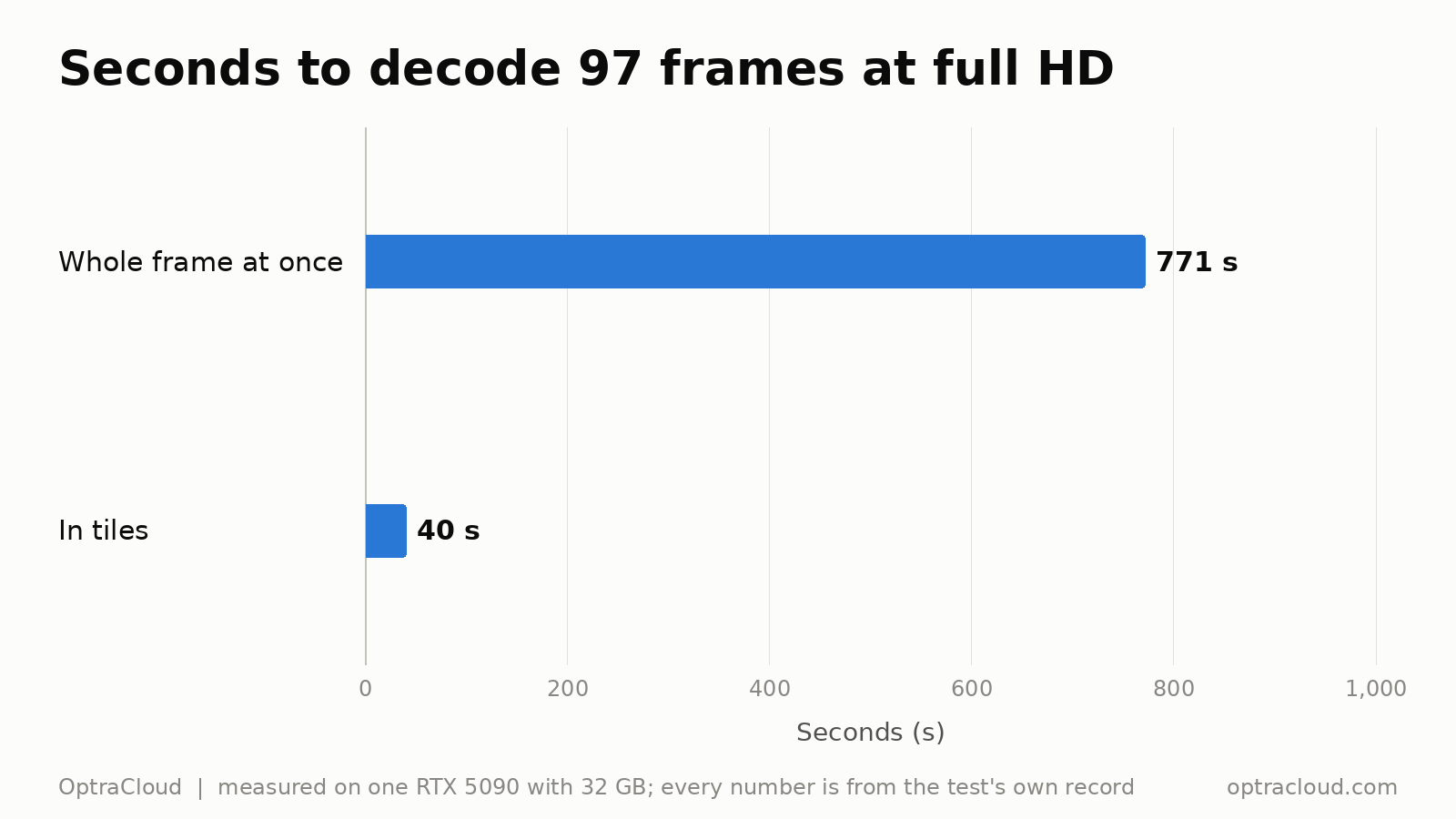
Seconds to decode 97 frames at full HD
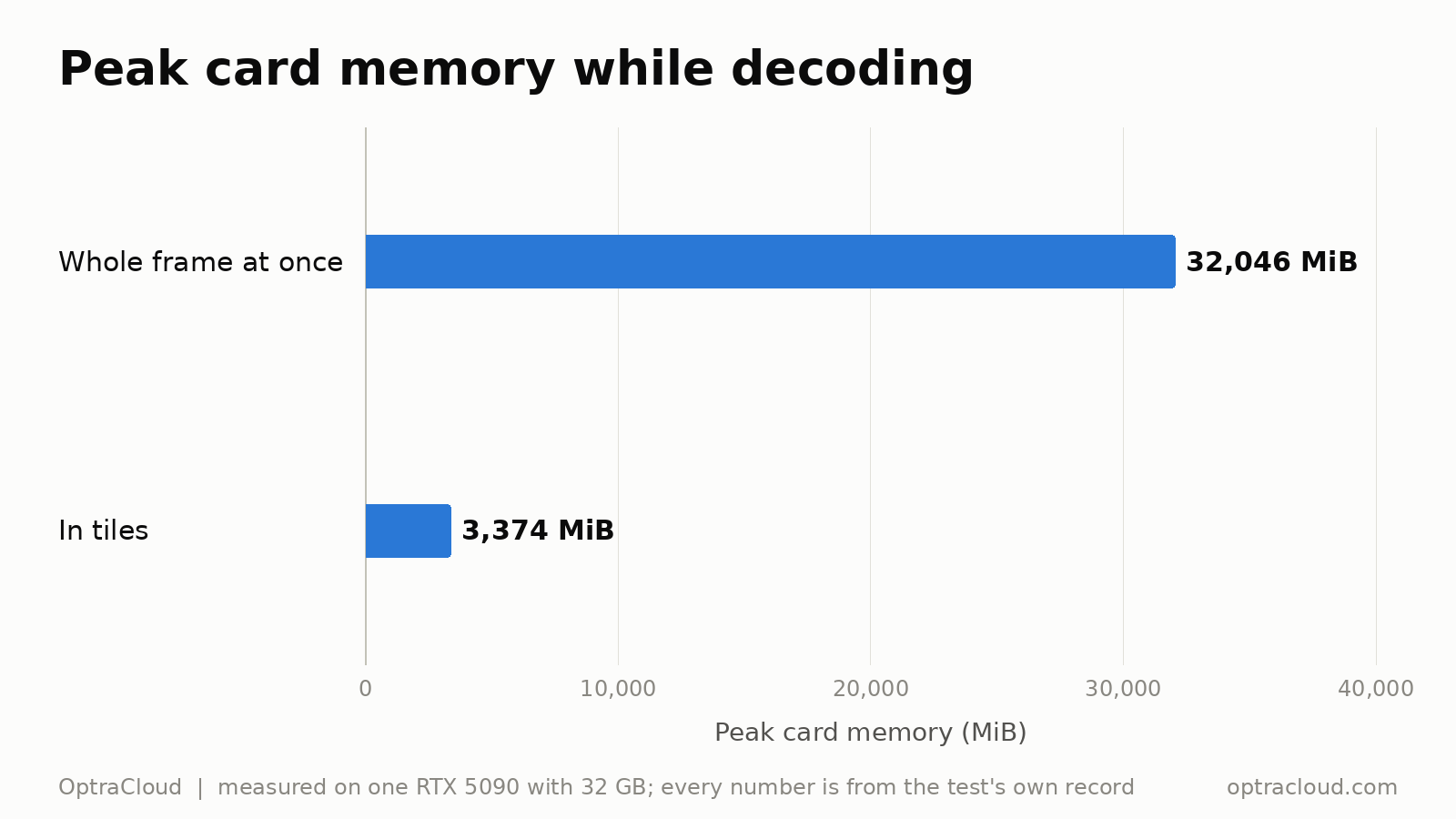
Peak card memory while decoding
To share. Pictures of these numbers, made from the same record and sized for a phone:
Did our own recipe work?
Not well. Our first clips were soft, and the faces wobbled from frame to frame. The fix was already on disk. The model’s makers ship a reference recipe, and we had not read it.
It works in stages. The first pass makes a small clip. The second pass refines it at the larger size, starting partway through. A plain enlarged picture is only a guess, and nothing makes it sharp until it is redone at the new size.
The staged recipe was also faster. A clip that took 40 to 70 seconds now took 32.
Were any of our own fixes wrong?
Yes, a pair of them. We had raised the guidance setting because the picture wobbled less. The reference uses a lower one, built for its sampler, so we had moved away from it. We had also cut the final step into short chunks of time. The reference never does, and chunks can leave a repeating flaw.
Our quality check was blind to the real fault. It shrank every frame and looked at only some of them. The fault was a face that grew and shrank between neighbouring frames.
One run even looked wonderful. We had told the model to use a camera on a tripod. It drew the tripod as the subject. A thing that does not move scores well. So we now look at the frames first and trust the metric second, and we never name camera gear in a prompt.
Do long runs hold up?
Not always. On one run of 203 minutes, most scenes took about 224 seconds. A pair of scenes took 2,171 seconds, with no change in settings.
We do not know why. So we now make long renders resumable, one file per scene. A stall then costs one clip, not the whole batch.
What did we not measure, and what do we not use?
This is one machine. The machine also runs a live desktop, which can quietly halve the speed. We have not shown that any figure taken on it is clean.
We do not use the audio the model returns. Only 2.7% of it was intelligible. We keep the picture and add our own sound.
What does this mean?
Running a video model well is mostly about the steps around the model. Load it once. Decode in tiles. Read the makers’ own recipe before inventing one. And judge a clip by looking at its frames before trusting a number about them.
Quick Search Our Blogs
Type in keywords and get instant access to related blog posts.