
Measured on 2026-09-19.
Baseline and change. The baseline is The model server with its original settings. The same model on the same pair of GPUs with the settings it started with; the tuned run changes one thing against it.
The changes set against it:
- the same, with the cache given a larger share of GPU memory
In Optra Studio. This test has no page in Optra Studio: it measured our model server on a bench, and has no project page.
No outputs to show. The numbers come from a benchmark script that ran on the server. We did not keep its raw logs with our notes, so we cannot show them here.
One AI model on a pair of GPUs can serve about 32 agents at once, and after that the extra ones only wait.
What did we want to know?
Our agents are small programs. Each one sends the model a request and waits for the answer. We wanted to know how fast the model answers, how much text it can read, and how many agents it can serve together.
We measured it on 2026-09-19, on the server itself. Nothing here is a guess or a model of the server. Where a figure is worked out, we show the sum.
Which exact model was it?
It is Qwen3.8-27B, squeezed down so that it fits on smaller GPUs. It ran on a pair of RTX A5000 GPUs. The table gives the exact files.
| What ran | |
|---|---|
| Model | cyankiwi/Qwen3.8-27B-AWQ-INT4 |
| Version | e3a700906e6a73ba4290b1873dc2ba8198527ab5 |
| Precision | AWQ int4 |
| Ran on | two 24 GB GPUs |
How fast is one request?
Alone on the server, a request gets its first word in 75 milliseconds. After that the model writes about 60.3 tokens, small pieces of words, every second.
What happens when many agents ask at once?
The server answers more agents at once, but each agent slows down. The total goes up while each share goes down.
Look at the end of the table. Past 32 agents, the total barely grows. It grows only 9%, while each agent loses 46% of its speed.
So past about 32 agents you are only queueing. That is where useful work stops growing.
| Test | Requests at once | All together (tokens/s) | Each request (tokens/s) |
|---|---|---|---|
| Run A | 1 | 59 | 59.4 |
| Run B | 8 | 312 | 39.0 |
| Run C | 32 | 589 | 18.4 |
| Run D | 64 | 641 | 10.0 |
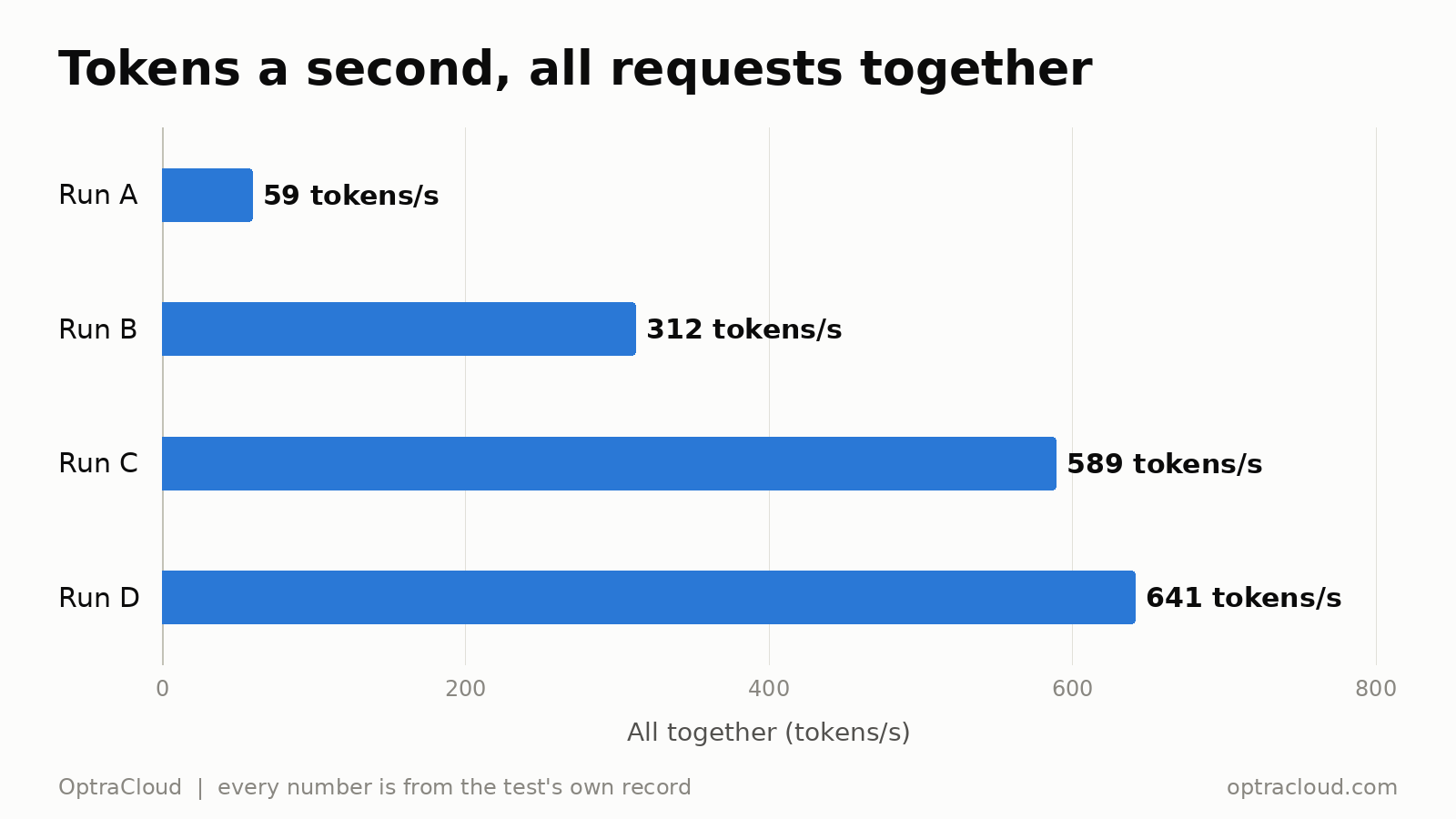
Tokens a second, all requests together
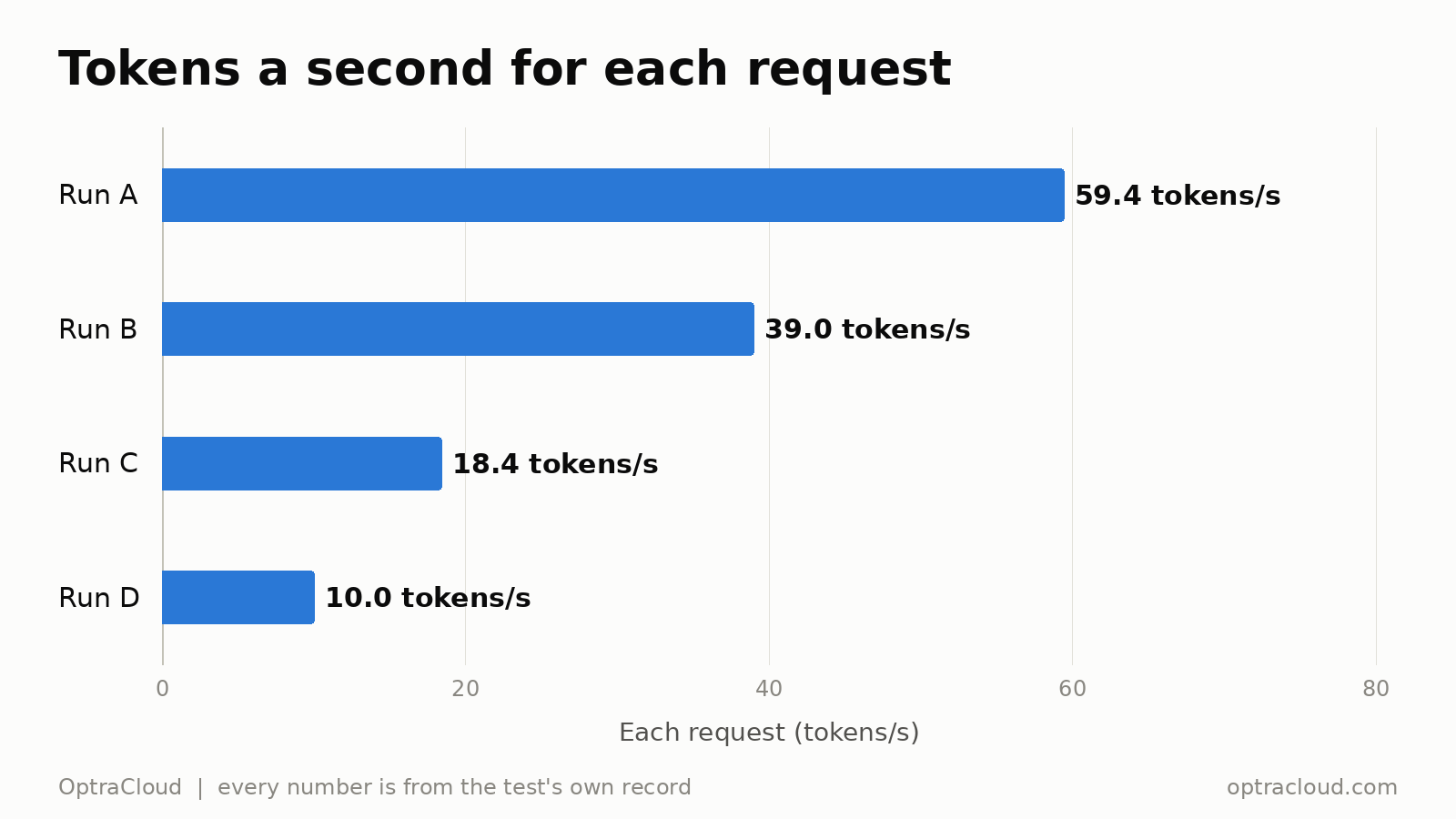
Tokens a second for each request
To share. Pictures of these numbers, made from the same record and sized for a phone:
How long does a long prompt take to read?
The model reads a prompt at about 1,000 tokens a second. So a prompt of 100K tokens waits about 100 seconds before the first word.
Once it starts, a long prompt hardly slows the writing. It slows by only about 11% across the whole window.
How many agents fit in memory?
Memory, not speed, usually sets the limit. Each agent needs room for everything it has read. The more an agent reads, the fewer fit.
The server’s working memory holds 493,447 tokens. It is handed out in blocks of 800. Even a short request uses a whole block.
| Text each agent holds | Agents that fit |
|---|---|
| 8,000 | 61 |
| 32,000 | 15 |
| 131,072 | 3 |
Is 64 agents the limit?
No. We sent 320 requests at the same moment. Of those, 159 ran at once and the rest waited.
Not one failed. The server queues extra requests. It does not refuse them.
Which of our own numbers were wrong?
Several were. The first was too good. We saw reading speeds of 25,228 and 154,723 tokens a second. A retry had sent the same prompt again, and the server answered it from memory. With a fresh prompt each time, the speed came back to about 1,000.
The second was a wrong name that looked like a finding. We asked the server for a measure under a name that does not exist. It answered zero, and we read the zero as a result. A figure that reads exactly zero deserves a check that it exists.
The third came from the wrong server. Our logs showed a median of 70.8 tokens a second, which is faster than this server can go. Those calls had gone to another server, and our log did not say which one answered.
The fourth was a check that was not enough. The server looked idle, but it is shared. A first run gave only 36 tokens a second for one request, on a model that does 60. Other traffic had arrived. So we now count what the server produced during each step. Any extra output is somebody else’s, and we run that step again.
What can we not explain?
With 4 long requests at once, the same work took one of a pair of times. About half the runs took 23.7 seconds and half took 11.2.
The slow time is 2.1 times the fast one.
We checked the obvious causes. The server paused work only 1 time in its whole life, and the prompts shared no front to remember. Some ideas remain, and we have not tested them. We do not know the cause.
What did we change, and what did nothing?
One free trick lives in the prompt. The server can reuse the start of a prompt it has seen. So put the shared text first. Shared text first took 6.78 seconds. Shared text last took 13.86. That is a 2x difference from order alone.
One server change stayed. We gave working memory a bigger share of the GPUs. It grew by 15%.
That raised the agents that fit at 8,000 from 61 to about 70.
One change did nothing. We guessed that reading was slow because the steps were small, so we made them bigger. Reading went from 1,002 to 1,019 tokens a second. That is noise, so we put it back.
What did we not measure?
This is one server on one day, and it is shared with other traffic. We did not measure the full trip through our own API, with its rate limit and the network. That is what our agents really feel. These figures say nothing about other models or machines.
What does this mean?
Size a fleet by where the curve bends, not by the largest number the server accepts. Treat a figure that is too good as a fault in your test until you prove otherwise. On a shared server, count the server’s own output during every step. And measure a theory before you keep the change it suggests.
Quick Search Our Blogs
Type in keywords and get instant access to related blog posts.