
Measured on 2026-11-08.
Baseline and change. The baseline is our static Diwali greeting, one picture. The same words and the same brand, drawn once as a still picture. The video is new artwork on the same idea, not that picture animated, so the two are set side by side and not timed against each other.
The changes set against it:
- HyperFrames, a short clip, drawn in software
HyperFrames turned a hand-written web page into a video of 10 seconds on a plain computer with no graphics card. The render took 12.7 seconds and the file weighs about 1.5 megabytes. This is one run, and nothing is compared with any other tool.
What did we want to know?
HyperFrames is an open-source tool, under the Apache-2.0 licence. It turns a web page into a video. The page’s animation is a paused timeline, and the tool steps through it frame by frame, captures a picture of each frame and joins them into a video file.
We asked a plain question. Does it run on one of our ordinary computers with no graphics card? What does a short clip cost, in seconds and in file size?
What is the baseline?
The baseline is our static Diwali greeting, one picture made by drawing the page once. The video is new artwork on the same idea, with the same words and brand. It is not that picture animated.
So the picture and the clip are set side by side and not timed against each other.
How did we test it?
We installed the tool with its install scripts switched off, and turned its usage reporting off before the first render. The install added 78 packages in about 5.7 seconds.
The page is hand-written: a row of lamps lit one by one, then the words Happy Diwali and the OptraCloud name. The clip is 10 seconds at 30 frames a second.
Each frame is 1,200 by 630 pixels, the size of a link card. The tool drew every frame in software, so no graphics card was used.
What did it cost?
The tool reported 12.7 seconds for the whole render. Our own clock around the command read 13.5 seconds.
The stage that captures the frames took 8.5 seconds. Compiling the page took 3.9, and joining the frames into a file took 0.1.
The file holds 300 frames and weighs 1,593,538 bytes, about 1.5 megabytes. It has no sound.
| Step | Seconds (s) |
|---|---|
| Whole render, as the tool says | 12.7 |
| Whole render, our own clock | 13.5 |
| Capturing the frames | 8.5 |
| Compiling the page | 3.9 |
| Joining the frames into a file | 0.1 |
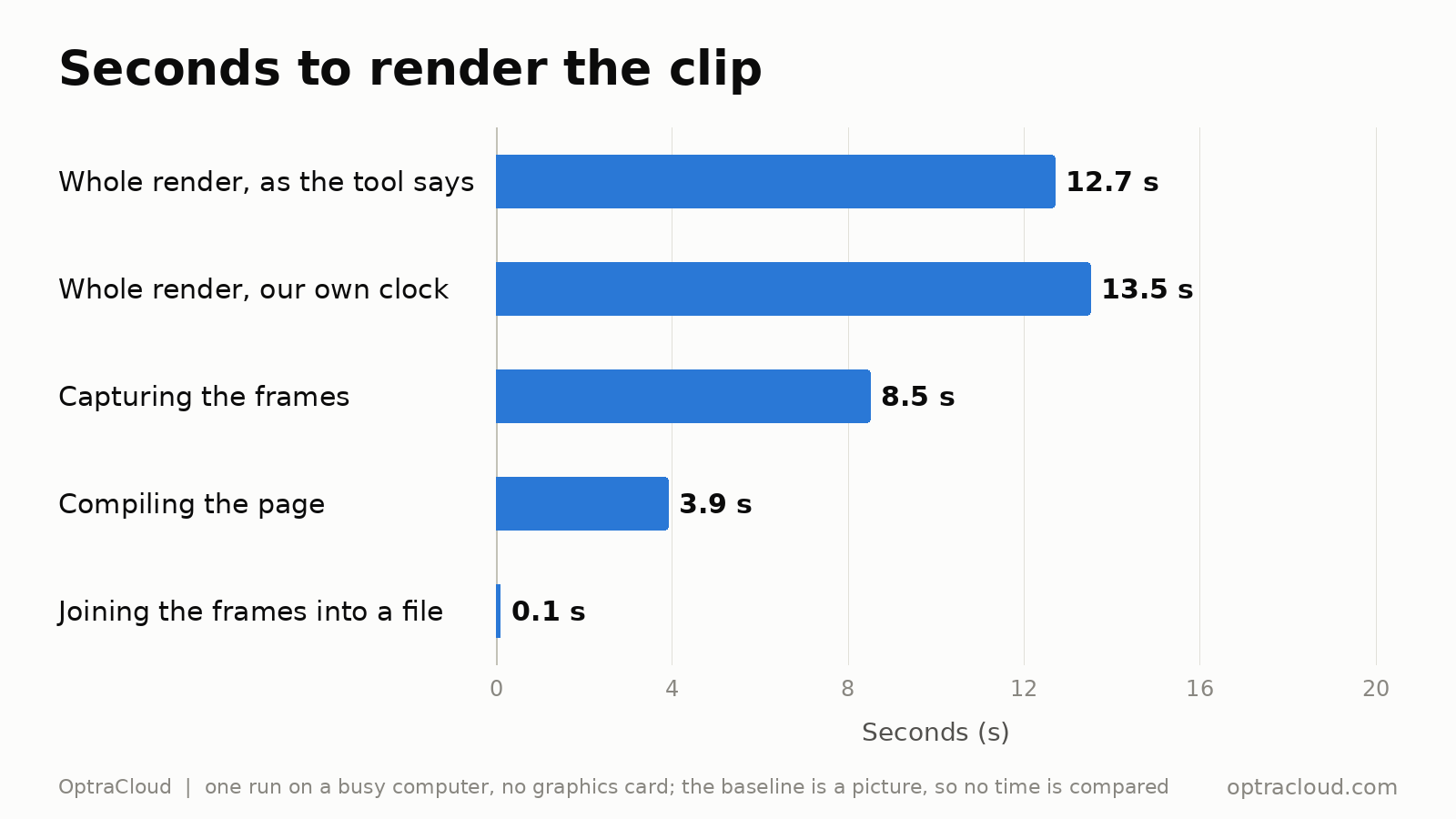
Seconds to render the clip
To share. Pictures of these numbers, made from the same record and sized for a phone:
How busy was the computer?
The computer was busy. Its load average read about 5.55, 6.04 and 5.79 just before the run.
The tool used 2 workers. It was one run of one clip, so another run may give other times.
What does the clip look like?
The picture is the baseline, and the clip is beside it. One reader looked at a few frames of the clip, and nobody else has watched it.
The lamps light one by one. The words Happy Diwali rise from 2.0 seconds, the OptraCloud name appears from 3.8, and the web address from 4.8.

Frames of the clip on one sheet, in time order, from the first lamps to the last frame.
The Diwali greeting
Baseline: our static Diwali greeting, one picture

Change: HyperFrames, a short clip, drawn in software
The picture and the clip are different artwork on the same idea, so look at each for what it is.
How does it compare with the static picture?
The static greeting is 365,007 bytes as a picture file. In our own test, drawing it once in a browser took between 0.17 and 0.20 seconds across a few runs.
That is one picture against 300 frames of different artwork, so it is not a speed comparison, and we make none.
What did we not measure?
We compared nothing with any other video tool, so we say nothing about whether HyperFrames is faster, slower, better or cheaper. We do not say 12.7 seconds is what a clip like this always costs.
We tried no longer clips, bigger sizes, sound, or the tool’s desktop app. We did not test the claim that it gives the same file every time, because the clip was rendered once. We did not use a graphics card or our render farm.
The clip was made to test the tool. It is not approved for an advertisement or a page, and nobody has decided to adopt HyperFrames.
Set it up yourself
Here are the downloads and the commands we used, copied from the test’s own files. Where a command held a private folder or machine name of ours, it shows a name in angle brackets for you to fill in.
The page we drew was written by hand in a file. No step makes it. Make the folder diwali and save the page we drew as diwali/index.html in it. The page is the first file under "The files we used, to download" below, as text. Then run the step that copies GSAP's file into that folder.
What you need first.
- The render ran on Node 22.
- FFmpeg was on the path.
- The page was drawn in a Chrome for Testing browser, chosen by an environment switch.
- No graphics card was used: the tool's own line says it drew by software.
Downloads.
- HyperFrames, revision
0.9.23 - GSAP, revision
3.15.1
Steps, in the order we ran them.
-
Make a folder and start a package file for it.
mkdir -p <trial folder> && cd <trial folder> && npm init -y -
Install HyperFrames at the version used, with install scripts off.
npm install [email protected] --ignore-scripts --no-audit --no-fund --save-exact -
Install GSAP at the version used, with install scripts off.
npm install [email protected] --ignore-scripts --no-audit --no-fund --save-exact -
Copy GSAP's browser file next to the page that is drawn.
cp node_modules/gsap/dist/gsap.min.js diwali/gsap.min.js -
Turn the tool's usage reporting off before the first run.
./node_modules/.bin/hyperframes telemetry disable -
Set the browser and the tool's switches for the run.
export HYPERFRAMES_BROWSER_PATH=<chromium path> HYPERFRAMES_NO_TELEMETRY=1 HYPERFRAMES_SKIP_SKILLS=1 HYPERFRAMES_CACHE_DIR=$PWD/cache -
Check the page with the tool's own linter.
./node_modules/.bin/hyperframes lint diwali -
Draw the ten-second clip with software rendering and two workers.
./node_modules/.bin/hyperframes render diwali -o out/diwali-10s.mp4 -q looks -f 30 --workers 2 --no-browser-gpu
What we did not keep. The lint line was run before the render; what it printed was not kept, so no file holds its result. The tool's own render log is the only output of the run that is kept.
The files we used, to download.
The commands as typed on the day, in order (our copy of the shell lines, not a tool's log).
Who made what?
HyperFrames is an open-source tool from HeyGen, under the Apache-2.0 licence. We are grateful for it.
What does this mean?
On one busy plain computer with no graphics card, a web page became a video of 10 seconds in about 12.7 seconds and 1.5 megabytes.
That answers the question we asked, that it runs here and what one clip cost, and nothing more.
Quick Search Our Blogs
Type in keywords and get instant access to related blog posts.